Resource Newbie's Guide to the Sanctum.

Currently reading:
Resource Newbie's Guide to the Sanctum.

Status
Not open for further replies.

A Newbies Guide to the Sanctum

With Pictures for Visual Learners


Are you new to forums and are struggling to navigate them? Maybe it feels a little confusing or intimidating. There's so much to look at, where do you even begin?

Well, I hope with this thread I can make any transitions onto the site smooth and painless. Think of this guide as my suggested order of exploration to get you settled in, especially if you're feeling nervous about ending up in the wrong place.


Getting Started


Upon joining, you have a rich brown theme of an old library with warm colors (there are many other display options, but I will cover these later in the guide. If you feel like you must change the display first, for your eyes or sanity, follow the [LINK] here to the post where I explain how to do that).

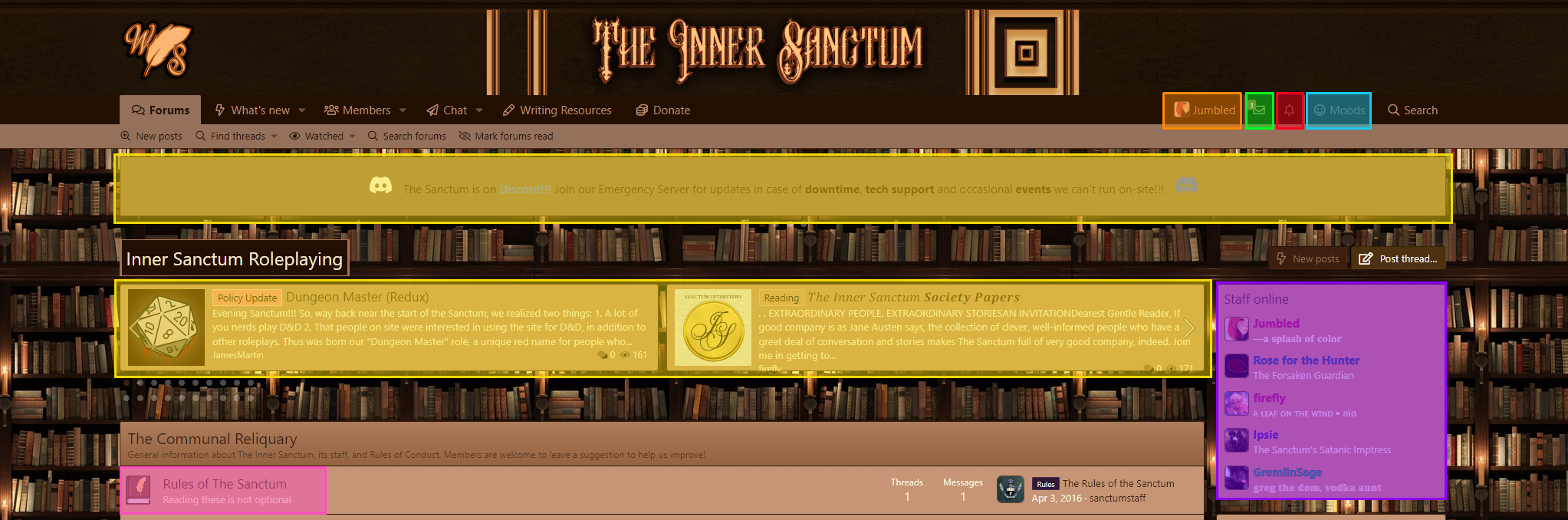
I will go over each of these sections I have marked with colors below, providing brief explanations.

843f7cbaf6eeb5f3ef89b967adb35277.png


β–ˆβ–ˆβ–ˆβ–ˆβ–ˆβ–ˆβ–ˆβ–ˆ The Site Rules
β–ˆβ–ˆβ–ˆβ–ˆβ–ˆβ–ˆβ–ˆβ–ˆ Your Account Menu
β–ˆβ–ˆβ–ˆβ–ˆβ–ˆβ–ˆβ–ˆβ–ˆ Direct Messages (DMs)
β–ˆβ–ˆβ–ˆβ–ˆβ–ˆβ–ˆβ–ˆβ–ˆ Alerts
β–ˆβ–ˆβ–ˆβ–ˆβ–ˆβ–ˆβ–ˆβ–ˆ Moods
β–ˆβ–ˆβ–ˆβ–ˆβ–ˆβ–ˆβ–ˆβ–ˆ Scrolling Site Announcements and Featured Threads
β–ˆβ–ˆβ–ˆβ–ˆβ–ˆβ–ˆβ–ˆβ–ˆ Staff Currently Online

1. β–ˆβ–ˆβ–ˆβ–ˆβ–ˆβ–ˆβ–ˆβ–ˆ The Site Rules
I recommend all users to read through these before all else. I get that this is a guide and if you're here, it's likely beyond the point of "the first thing you do" but hopefully you understand what I mean. There are many different websites out there, and while some allow certain things, others do not. A big one for The Writer's Sanctum/The Inner Sanctum is that we do not allow roleplay to happen outside of the forums. Sometimes not being allowed to play in messages privately bothers people, and if that's the case for you, Sanctum might not be the best fit.

2. β–ˆβ–ˆβ–ˆβ–ˆβ–ˆβ–ˆβ–ˆβ–ˆ Direct Messages (DMs)
Your Direct Messages should have a welcome letter that's sent automatically when you join, you should see a little red 1 next to the envelope. This is the next place I suggest looking as a new user. It provides you with a series of links that explains the forums and gives you steps to follow to finish setting up your account. Introducing yourself is the next step, you can follow the link in the message to see the forum. I will cover introductions later in this guide.

3. β–ˆβ–ˆβ–ˆβ–ˆβ–ˆβ–ˆβ–ˆβ–ˆ Your Account Menu
This menu houses many useful links. When you first join, the top section, and bottom section will be more important to focus on. The middle section comes in handy after some time spent on site.

Top Section
  • The top section has your Profile Picture (pfp) where you can edit it to a photo that follows the site rules.
  • If you click Your User Name it will take you to your profile.

Middle Section
  • Your News Feed will show you all the activity of people you have "followed" on site.
  • Your Content will show you a list off all of your recent post activity.
  • Reactions Received is a record for all reactions you've earned on site.
  • Alerts takes you to a big list of your site notifications.
  • If you invite others to the site by providing your personal link, you'll see them listed in Your Referrals.

Bottom Section
  • Your Account Details allow you to customize things such as your email and profile information.
  • Password and Security will let you change your password.
  • Privacy allows you to control what people are able to see about you.
  • Preferences has your time zone and options regarding your notifications. You can also change your theme from this menu.
  • Your Signature is where you go to change what displays under your posts and in your About section on your profile.
  • Connected Accounts allows you to login to the site by using an account you already hold through Google, Microsoft or Spotify.
  • Following is a list of people that you have selected to follow on site. You can easily edit your followers from here.
  • Ignoring is a list of people you are ignoring on site. Ignoring acts as a full block. You must edit from your list to unignore someone.
  • The Personal Notepad is a place you can make notes to save on site. Some members use this to easily store posting codes or character information.
  • Moods are a customization you can use to show off how you're feeling. If you select a mood, you will not have the option to remove it, only to change it to any on the list.


Notice how navigating to your Account Details brings you to the entire overview of your account. There is a list on the left hand side that lets you switch between all of the options available without having to go back to the button that displays as your pfp and name in the top toolbar.

If you are new to the site, I would suggest looking over your settings (but you can always return to them and change them to your liking whenever you need to), adding a picture to your profile (I don't recommend using a real photo of your face or anything that identifies you), and updating all of your writing preferences found at the bottom of your account details.

4. β–ˆβ–ˆβ–ˆβ–ˆβ–ˆβ–ˆβ–ˆβ–ˆ Alerts
There is a bell icon there, and occasionally you might notice someone has given your a like or a heart to something you have posted. Other alerts, or notifications, might include new posts to your threads, and serve as an easy way to navigate to them. You can change how you receive alerts by navigating to your preferences. If you select "custom" a drop-down menu will appear. Make sure to hit "Save" when you're done.

5. β–ˆβ–ˆβ–ˆβ–ˆβ–ˆβ–ˆβ–ˆβ–ˆ Moods
Moods are a fun way to personalize your account. You can change them right from the toolbar, which is faster than doing it from the account screen. The mood of your choice appears underneath your username and will be displayed wherever you post as well as the quick preview of your profile when someone hovers over your name.

6. β–ˆβ–ˆβ–ˆβ–ˆβ–ˆβ–ˆβ–ˆβ–ˆ Scrolling Site Announcements and Featured Threads
In both of these sections you will be able to find announcements, event notices, and other things of note, like the discord server we use for movie streams and the occasional game night.

7. β–ˆβ–ˆβ–ˆβ–ˆβ–ˆβ–ˆβ–ˆβ–ˆ Staff Currently Online
If you need help from a staff member, reaching out to someone on this list is typically the best method if you are looking for a quick response time.


 
Last edited:


The Welcome Letter


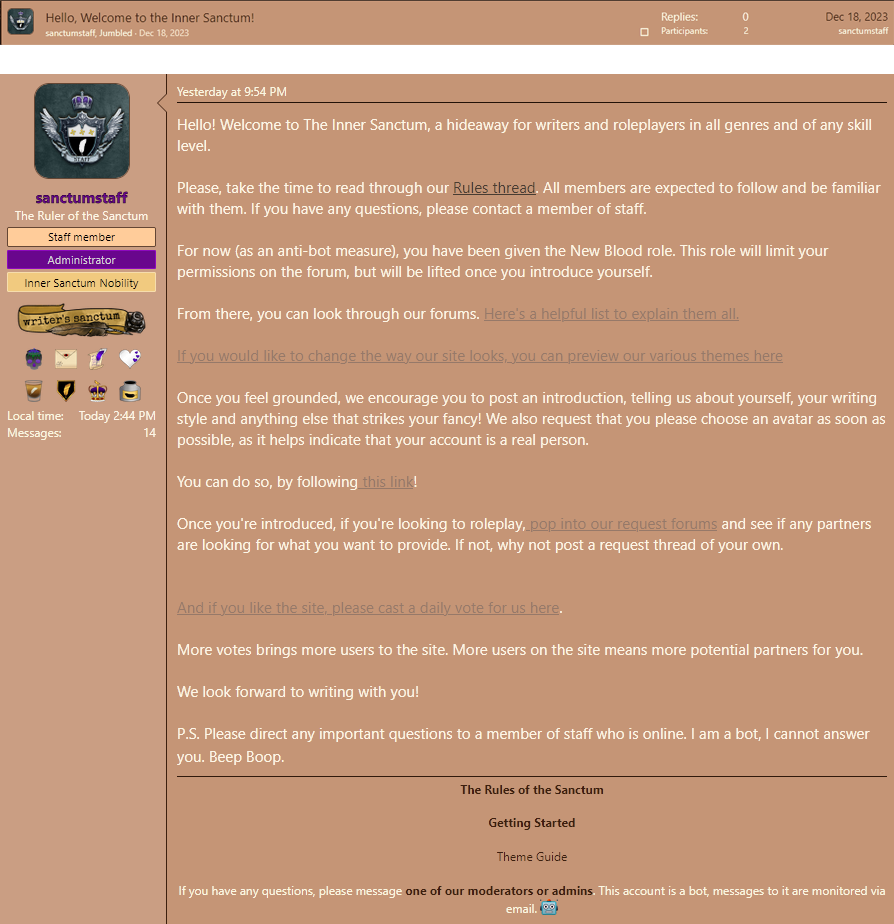
I must express how helpful this letter is when you are trying to get started. Read the entire thing. It contains several links to click on, each one with their own purpose, ultimately aiming to help you get started and to drop your "New Blood" role, which is also explained right there in the message.

The account sanctumstaff is not a person or standard account. It mentions being a robot both at the end of the letter as well as in its signature. If you are on mobile, you will likely want to turn your phone sideways to see any signatures.

Remember, if you need help, refer to point 7. β–ˆβ–ˆβ–ˆβ–ˆβ–ˆβ–ˆβ–ˆβ–ˆ Staff Currently Online in the post above. If you are on mobile, you will need to scroll down the home page because all of the main boxes will be compressed to fit the smaller screen.


7d7c020370392d03464a712fc0f10461.png

** PLEASE NOTE:

I personally find the phrasing here confusing:


Once you feel grounded, we encourage you to post an introduction, telling us about yourself, your writing style and anything else that strikes your fancy! We also request that you please choose an avatar as soon as possible, as it helps indicate that your account is a real person.

You can do so, by following this link!


Try to read it more like:


"Once you feel grounded, we encourage you to post an introduction ... You can do so, by following this link!"


To me, the original reads like it's trying to show you where to go to apply an avatar to your account, which many have likely figured out already, therefore, never clicking that link to discover that is not the case.


The Town Square


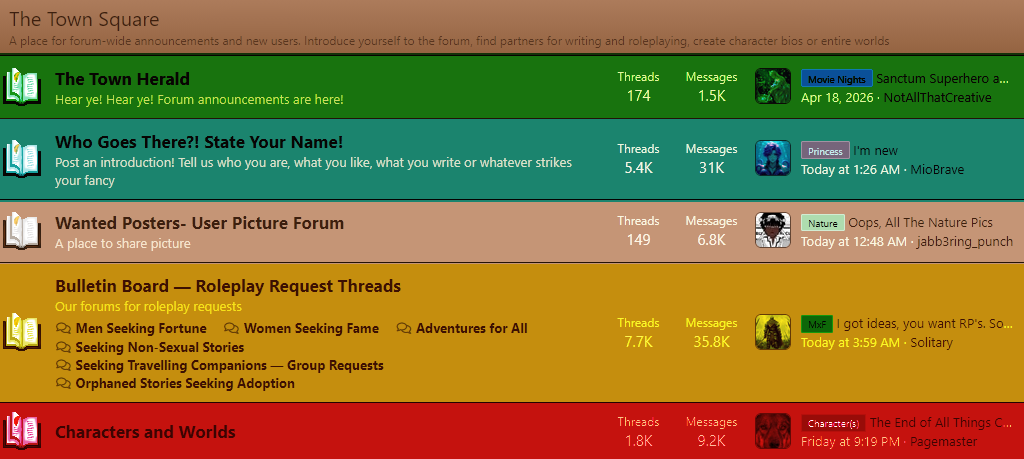
This is a section found on the home page of the site that is incredibly helpful for users both new and old.


4bab199d5138b524cdec9bcd8f88b654.png


β–ˆβ–ˆβ–ˆβ–ˆβ–ˆβ–ˆβ–ˆβ–ˆ Announcements
β–ˆβ–ˆβ–ˆβ–ˆβ–ˆβ–ˆβ–ˆβ–ˆ Introductions
β–ˆβ–ˆβ–ˆβ–ˆβ–ˆβ–ˆβ–ˆβ–ˆ Request Threads
β–ˆβ–ˆβ–ˆβ–ˆβ–ˆβ–ˆβ–ˆβ–ˆ Characters and Worlds


1. β–ˆβ–ˆβ–ˆβ–ˆβ–ˆβ–ˆβ–ˆβ–ˆ Announcements
This is a log of site updates, staff messages, as well as upcoming events used by staff, typically the site admin more specifically.

2. β–ˆβ–ˆβ–ˆβ–ˆβ–ˆβ–ˆβ–ˆβ–ˆ Introductions
This is a section of the forum where New Blood can go to post a little about themselves and others can welcome and greet new users into our friendly community. At the top of the page, there is a place to type in a title and choose a prefix (a series of titles meant to be fun but otherwise non-crucial to posting in this section). After you click inside of the "Thread Title" bar, the page will load a message box for you to type. Once you have your intro ready to go, simply click the Post Thread button.

3. β–ˆβ–ˆβ–ˆβ–ˆβ–ˆβ–ˆβ–ˆβ–ˆ Request Threads (RT)
Think of these advertisements as a way to convey the types of stories the person posting wants to write, not as personal ads. You can be a female, but want to write as male characters, for example. RTs are not meant for dating, hook-ups, or finding people you might enjoy flirting with. This is a website for writers of all levels to find like-minded people we enjoy creating stories with. Prefixes are available to help users know what you're looking for, and no, I don't know why there's an option for "All" vs "Any" they sound the same to me.
  • Men Seeking: Usually used when you want to write a main character that is a male.
  • Women Seeking: Usually used when you want to write a main character that is a female.
  • For All: Gender of the characters do not matter to you
  • Non-Sexual: Those seeking stories with no sex.
  • Group: For when you want to make a story that includes several users.
  • Orphaned: Instead of posting new story ideas, you can post stories that have already been started but have died or become inactive. This forum has rules to better explain when a story fits this criteria.

4. β–ˆβ–ˆβ–ˆβ–ˆβ–ˆβ–ˆβ–ˆβ–ˆ Characters and Worlds
This is an area where a user can store their many original characters in a single thread if desired. This section is also intended to store in-depth world-building and character sheets for roleplays to help keep users organized. There are prefixes available to categorize threads.


**Note: If you're trying to figure out where a thread of OOC (out of character) chatter should go, and you wish to plot for your story on site, you'll want to post the there here [ LINK ] using the "Roleplaying" prefix.


Main Places to Roleplay


If you're newer to the site, this is possibly confusing because these options are in different sections, and divided by The Outer Sanctum, which is a specific world I won't be covering in this post. If you think you need to move your post to a different thread to remain within site rules, please reach out to any staff online for help, it's not a huge deal.

f2dbbbde2c4f696628a08de82643ffaf.png


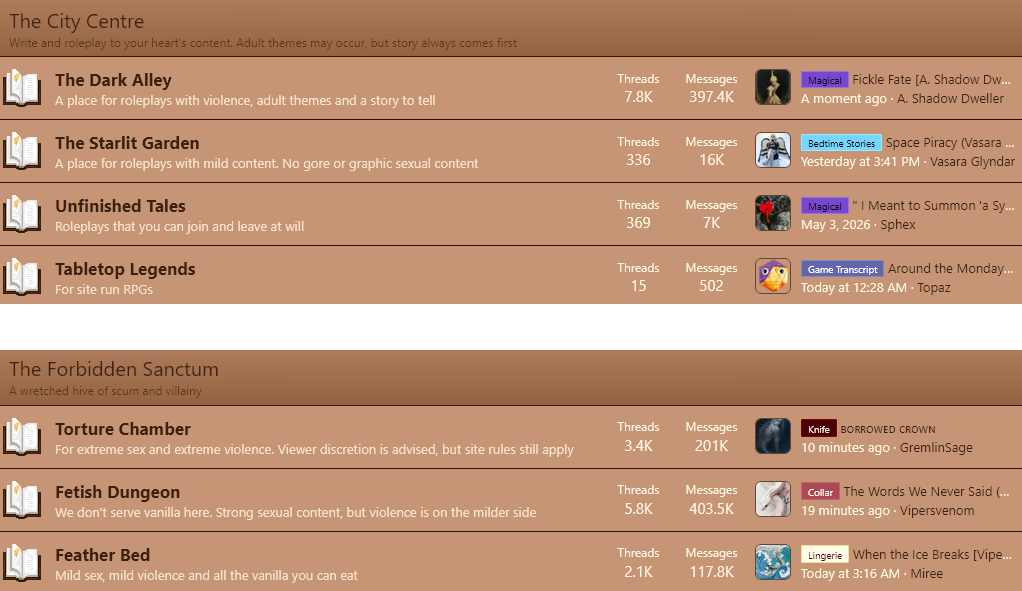
If you are not certain where you should post your story because of the many options, it's okay. I'll attempt to explain these better, because I know when I was new, this was very confusing to me. I won't cover all of the areas in The City Centre, so if you wish to know more about them, clicking on the title will bring you to the area where you can find Rules pinned at the top of the page.


The Dark Alley is genre heavy with prefixes available to label your threads. They can contain violence and sex, but are very story-focused. If you describe your plot to a person, sex is not one of the main components of your story/your story could still exist without sex scenes. However, these elements are still allowed to exist within this section:
  • Graphic violence of any kind
  • Sexual content that is significantly more than vanilla
  • Excessive foul language
  • Any content likely to be offensive or seen as such


The Forbidden Sanctum can also have story-based roleplays, however, sex is always a central component of the role-play. A rule of thumb: if you cannot easily describe your role-play in three sentences without mentioning the sexual aspect, your thread goes somewhere in this section. Here are some key points for the stories that wind up here:


Torture Chamber: Not for the squeamish. This forum has only one prefix, Knife. This is intended as a content warning for any posts on this forum that appear elsewhere on site.
  • Themes of rape and violence in a sexual nature
  • Hardcore violence; being overly descriptive with how you're describing blood & guts, the ways limbs break & sound, and other things that might be scary or triggering, as a main component of your story telling
  • Hardcore BDSM. Blood-play, Branding, Body Modification, Extreme torture


Fetish Dungeon: You can get as freaky as you want in here, so long as everybody leaves with all their limbs. This forum has only one prefix, Collar. This is intended as a content warning for any posts on this forum that appear elsewhere on site.
  • The dungeon is for that sweet middle spot between the Vanilla and the Over the top
  • Kink. Ordinary BDSMβ€”whippings, wax play, leashes and collars, rough sex. If it doesn't leave permanent damage, it belongs here
  • Violence, though shy of full on torture


Feather Bed: This forum is for primarily vanilla sexual content. A place for the romantic in all of us. This forum has only one prefix, Lingerie. This is intended as a content warning for any posts on this forum that appear elsewhere on site.
  • Mild bondage and light fetish play
  • Consensual sex with no significant violence involved
  • Kink content is allowed, but nothing extreme: You can spank, you can pull out the feathers, maybe tug at the hair a little, but when you're done, no one should walk away with bruises


Site Themes


1778428630948.png

I cover this in a few different threads, so you'll simply want to follow the links to learn more.

  • This [ LINK ] will take you to a listed display of themes we have available
  • This [ LINK ] explains how to change your theme using two methods


Status
Not open for further replies.
Back
Top Bottom